
Category
A 3D product configurator is an interactive tool that lets shoppers customize a product, its color, material, size, components, or features, and see every change rendered instantly in a rotatable 3D model. Instead of choosing from a grid of flat photos, the buyer builds the exact version they want and watches it come together on screen before they buy. If

6 min read
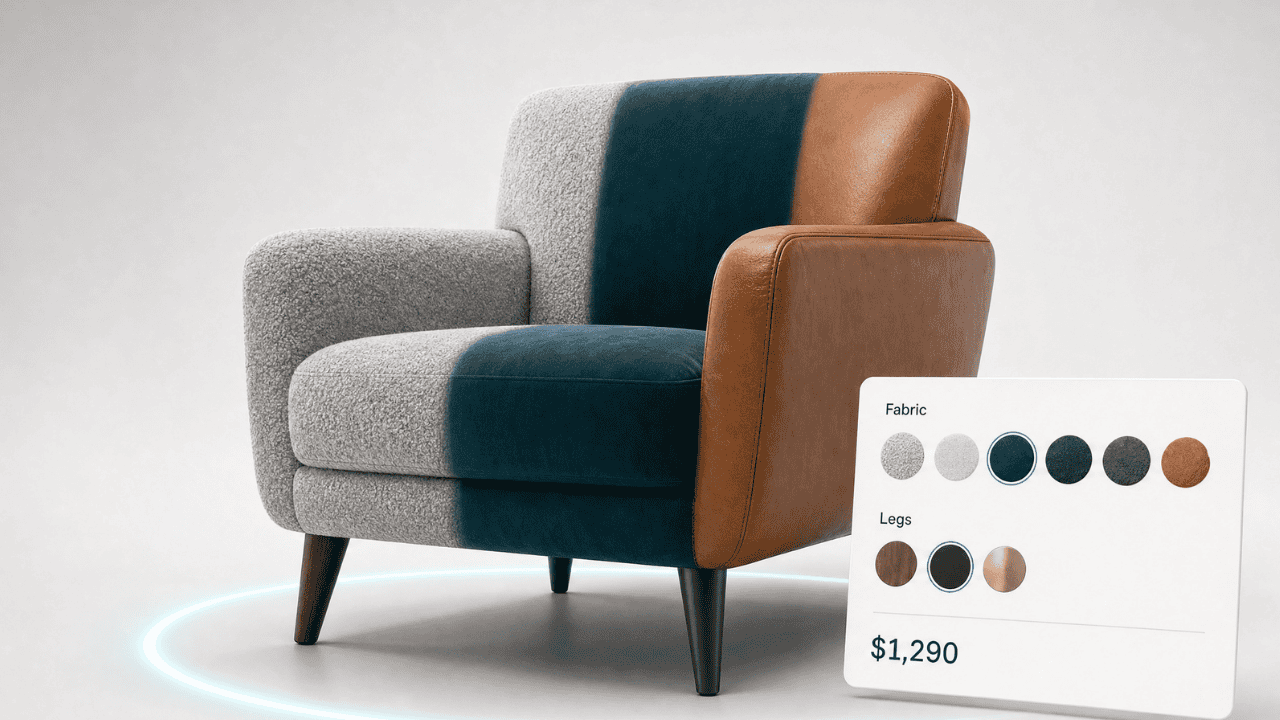
A 3D product configurator is an interactive tool that lets shoppers customize a product, its color, material, size, components, or features, and see every change rendered instantly in a rotatable 3D model. Instead of choosing from a grid of flat photos, the buyer builds the exact version they want and watches it come together on screen before they buy.
If you sell products that come in more than one variation, a sofa in twelve fabrics, a bike in three frame sizes, a pair of sneakers with custom colorways, a configurator turns a confusing set of dropdown menus into a single, visual, engaging experience. And that experience does real commercial work: shoppers who interact with 3D content convert at meaningfully higher rates and return fewer orders, because they know exactly what they’re getting.
This guide explains what a 3D product configurator actually is, how it works, and why it has moved from a “nice to have” to a core part of how competitive online stores sell.
What a 3D product configurator does
At its simplest, a configurator does three things at once:
It displays the product as a real-time 3D model the shopper can rotate, zoom, and inspect from any angle. It lets the shopper make choices, swap materials, change dimensions, add or remove parts, through a clear set of controls. And it updates the visual instantly, so the product on screen always reflects the exact configuration the buyer has selected.
Behind the scenes, the configurator is also doing commercial work: mapping each selection to a specific SKU or price, validating that the chosen combination is one you can actually make, and passing the final specification through to the cart or a quote. For B2B sellers, that last step matters enormously: it removes the back-and-forth of emailing spec sheets and manually building quotes.
How does a 3D product configurator work?
A configurator is built on three layers.
The first is the 3D model, a digital version of your product created from images, CAD files, photogrammetry (scanning a physical item), or built by a 3D artist. Modern configurators render this model in the browser using WebGL.
The second is the configuration rules engine. This defines what can change and how choices relate to each other. A rule might say “the walnut finish is only available in the large size,” or “selecting the leather upgrade adds $400.” Good configurators make these rules easy to manage without code.
The third is the integration layer, which connects the configured product to your store, pushing the right SKU, price, and specification into the cart on platforms like Shopify or WooCommerce, or into a quote for B2B sales.
With a no-code 3D and AR platform, your team manages all three layers through a visual interface. There’s no need for a developer to add a new color or adjust a price. (See our guides on adding a configurator to Shopify and WooCommerce.)
Why your store needs one
It lifts conversion
The single biggest reason to add a configurator is that it sells more. Shopify’s own data shows that interactions with products that have 3D and AR product experiences convert at a 94% higher rate than products without. When shoppers can build and inspect exactly what they want, hesitation drops and purchase confidence rises.
It cuts returns. Returns are one of the most expensive problems in ecommerce. US shoppers returned roughly $849.9 billion in merchandise in 2025, about 15.8% of all retail sales, and in categories like apparel and furniture the return rate runs far higher. A large share of those returns come down to a single cause: the product wasn’t what the buyer pictured. When a customer configures a product themselves and sees it in accurate 3D, expectation and reality line up, and returns fall. Shopify reports 3D and AR product media can reduce returns by up to 40%.
It reduces the cost of selling
For B2B and made-to-order businesses, a configurator replaces physical samples, printed catalogs, and hours of manual quoting. The buyer specifies the product themselves, correctly, the first time, which shortens the sales cycle and frees your team from repetitive quote-building.
It sets you apart
Most stores still sell variable products through a stack of dropdown menus and a few static photos. A configurator is a visibly better experience, and shoppers notice. It signals that your brand is modern and that your products are worth exploring.
Which businesses benefit most?
Configurators deliver the clearest return for products with meaningful variation or product configuration, including:
- Furniture and homeware: fabrics, finishes, dimensions, and modular layouts
- Industrial and B2B equipment: components, capacities, and technical specifications
- Automotive and mobility: trims, colors, and accessory packages
- Signage, print, and promotional goods: sizes, materials, and custom artwork
- Fashion and footwear: custom colorways, materials, and monogramming
If your product only comes one way, a configurator is less relevant, but a 3D viewer may still help you show it off. If it comes in many ways, a configurator is one of the highest-impact upgrades you can make.
Getting started
You don’t need a development team or a long build to launch a configurator. Plattar’s no-code 3D and AR platform let’s your team create the 3D experience, define the rules, and embed it into your existing store, all through a browser, and all managed in-house afterward.
Want to see what a configurator looks like for a product like yours? Explore Plattar’s configurator examples or book a demo and we’ll walk you through it.
Frequently asked questions
What is a 3D product configurator?
A 3D product configurator is an interactive online tool that lets shoppers customize a product’s options, such as color, material, size, or components, and see each change rendered instantly on a rotatable 3D model before they buy.
How is a configurator different from a normal product page?
A standard product page shows fixed photos and asks the shopper to pick options from dropdown menus, imagining the result. A configurator shows the actual chosen combination in real-time 3D, so there’s nothing left to imagine.
Do shoppers need to download an app to use it?
No. Modern configurators, including Plattar’s, run in the web browser using WebGL. Shoppers just open your product page, nothing to install.
Does a 3D product configurator work on mobile?
Yes. Browser-based configurators work across smartphones, tablets, and desktops, which matters because most ecommerce traffic is now mobile.
Can I add a configurator without a developer?
Yes. No-code platforms let your content or ecommerce team build, manage, and update configurators through a visual interface, with no ongoing developer involvement.
How long does it take to launch one?
With a no-code platform and existing 3D models or CAD files, a configurator can be live in days rather than months. Creating high-quality 3D models is usually the main variable in the timeline.
Will a configurator really reduce my returns?
It can. Because shoppers see an accurate representation of exactly what they’ve configured, expectations match reality more closely, and industry data shows 3D and AR media can cut returns by up to 40%.
Ready to see it in action? Book a demo or read our complete guide to 3D product configurators.
About the author
Rupert Deans
CEO / Founder, PLATTAR
Rupert writes about 3D and AR commerce, the technology behind immersive product experiences, and how retail teams put it to work. Previously led content at two ecommerce platforms.
Ready to bring your products to life?
See how Plattar can lift engagement and conversion for your brand. Book a personalised walkthrough with our team.
Book a demo
Talk to sales